



2. 获取百度图片
只用于技术研究,不允许非法用途
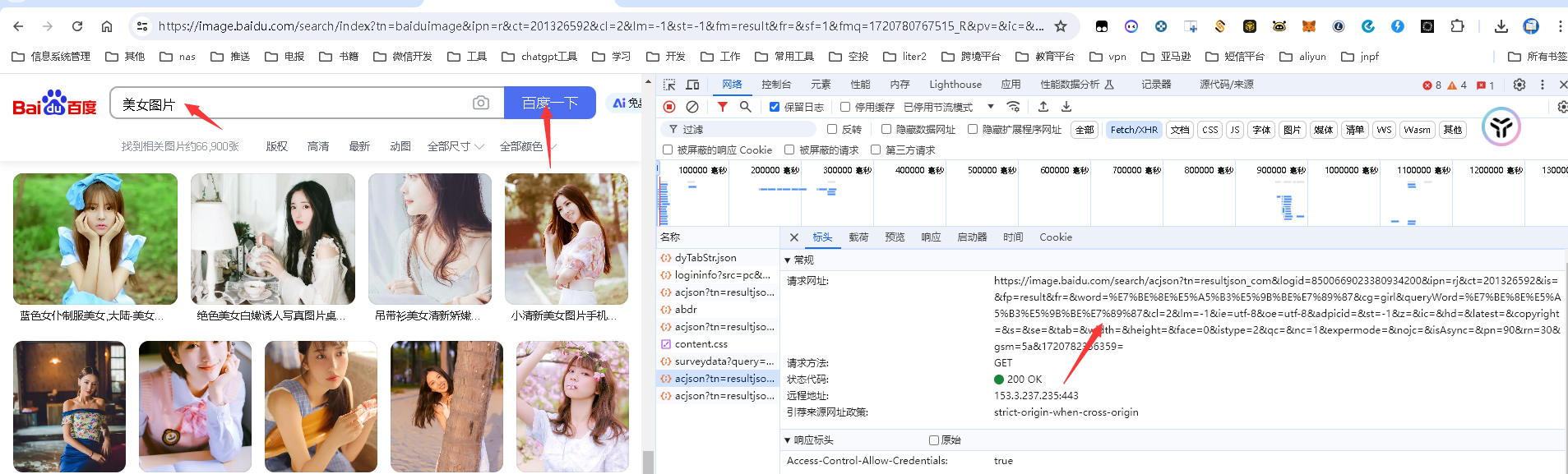
地址:
源码
# 地址: https://image.baidu.com/search/acjson?tn=resultjson_com&logid=7553304142250956418&ipn=rj&ct=201326592&is=&fp=result&fr=&word=%E7%BE%8E%E5%A5%B3%E5%9B%BE%E7%89%87&cg=girl&queryWord=%E7%BE%8E%E5%A5%B3%E5%9B%BE%E7%89%87&cl=2&lm=-1&ie=utf-8&oe=utf-8&adpicid=&st=-1&z=&ic=&hd=&latest=©right=&s=&se=&tab=&width=&height=&face=0&istype=2&qc=&nc=1&expermode=&nojc=&isAsync=&pn=60&rn=30&gsm=3c&1720780769449=
# 获取百度图片
# 开发时间 2024/07/12
import requests
url = "https://image.baidu.com/search/acjson?tn=resultjson_com&logid=7553304142250956418&ipn=rj&ct=201326592&is=&fp=result&fr=&word=%E7%BE%8E%E5%A5%B3%E5%9B%BE%E7%89%87&cg=girl&queryWord=%E7%BE%8E%E5%A5%B3%E5%9B%BE%E7%89%87&cl=2&lm=-1&ie=utf-8&oe=utf-8&adpicid=&st=-1&z=&ic=&hd=&latest=©right=&s=&se=&tab=&width=&height=&face=0&istype=2&qc=&nc=1&expermode=&nojc=&isAsync=&pn=60&rn=30&gsm=3c&1720780769449="
## 添加请求头
headers = {
'User-Agent': 'Mozilla/5.0 (Windows NT 10.0; Win64; x64) AppleWebKit/537.36 (KHTML, like Gecko) Chrome/118.0.0.0 Safari/537.36'
}
resp = requests.get(url=url,headers=headers)
#打印文本内容
#print(resp.text)
resp = resp.json()
data_list = resp['data']
lst = []
for item in data_list:
# len函数可以判断字段是否存在key
if len(item):
lst.append(item['thumbURL'])
count = 0
for img_url in lst:
count = count + 1
resp2 = requests.get(img_url,headers=headers)
print("爬虫第{}张".format(count))
# w:写的意思 b:表示写入二进制数据
# with 为上下文管理器, 自动关闭资源
with open("img/"+str(count) + ".jpg",'wb') as file:
file.write(resp2.content)
print("爬虫完毕")
评论区