





十四、asyncio并发编程
一、事件循环
一、简单使用
import asyncio
import time
#定义一个协程
async  def get_html(url):
    print("start get url")
    await asyncio.sleep(2)  #协程中的等待两秒
    print("end get url")


if __name__ == '__main__':
    start_time = time.time()
    #----------------1.传入协程函数---------------
    #事件循环机制
    # loop = asyncio.get_event_loop()
    # loop.run_until_complete(get_html("http://www.baidu.com"))
    # end_time = time.time()
    # print("共计花费时间:{}".format(end_time-start_time))

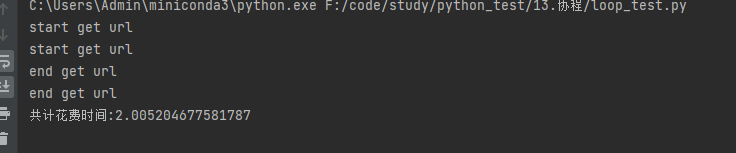
    # ----------------2.传入列表---------------
    # 事件循环机制
    loop = asyncio.get_event_loop()
    tasks = [get_html("http://www.baidu.com") for _ in range(2)]
    loop.run_until_complete(asyncio.wait(tasks))
    end_time = time.time()
    print("共计花费时间:{}".format(end_time - start_time))
二、携带返回值
import asyncio
import time
#定义一个协程
async  def get_html(url):
    print("start get url")
    await asyncio.sleep(2)  #协程中的等待两秒
    print("end get url")
    return "hello world"


if __name__ == '__main__':
    start_time = time.time()
    # ----------------3.携带返回值---------------
    # loop = asyncio.get_event_loop()
    # get_feature = asyncio.ensure_future(get_html("http://www.baidu.com"))
    # loop.run_until_complete(get_feature)
    # print(get_feature.result())
    # end_time = time.time()
    # print("共计花费时间:{}".format(end_time - start_time))

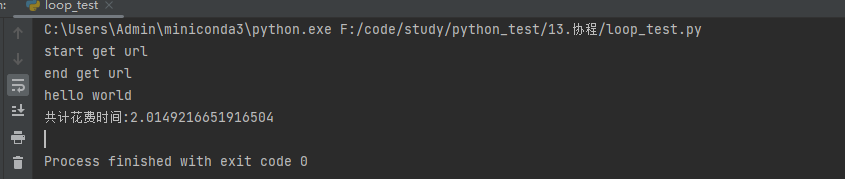
    # ----------------4.携带返回值---------------
    loop = asyncio.get_event_loop()
    task = loop.create_task(get_html("http://www.baidu.com"))
    loop.run_until_complete(task)
    print(task.result())
    end_time = time.time()
    print("共计花费时间:{}".format(end_time - start_time))
三、有回调且携带参数
import asyncio
import time
from functools import partial  #将一个函数包装成另一个函数
#定义一个协程
async  def get_html(url):
    print("start get url")
    await asyncio.sleep(2)  #协程中的等待两秒
    print("end get url")
    return "hello world"

def callback(feature):
    print("start callbback")

def callback1(url,feature):
    print("url:{}".format(url))
    print("start callbback")


if __name__ == '__main__':
    start_time = time.time()

    # ----------------4.有回调---------------
    # loop = asyncio.get_event_loop()
    # task = loop.create_task(get_html("http://www.baidu.com"))
    # task.add_done_callback(callback)
    # loop.run_until_complete(task)
    # print(task.result())
    # end_time = time.time()
    # print("共计花费时间:{}".format(end_time - start_time))

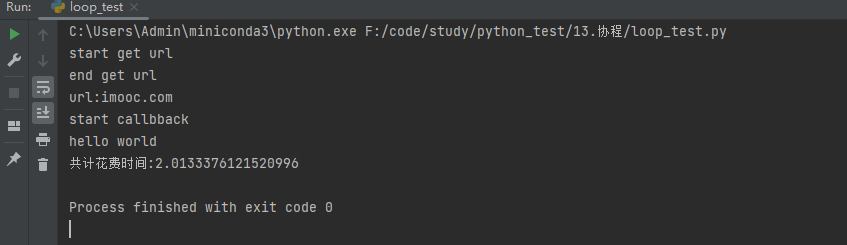
    # ----------------4.有回调且携带参数---------------
    loop = asyncio.get_event_loop()
    task = loop.create_task(get_html("http://www.baidu.com"))
    task.add_done_callback(partial(callback1, "imooc.com"))
    loop.run_until_complete(task)
    print(task.result())
    end_time = time.time()
    print("共计花费时间:{}".format(end_time - start_time))
四、asyncio 中的gather 和 wait 区别
在 Python 的 asyncio 模块中,gather 和 wait 都是用于并发执行多个协程的函数,但它们有一些关键的区别:
asyncio.gather
功能:
gather 用于并发运行多个协程,并收集它们的结果。行为:它会等待所有传入的协程完成,并返回一个包含所有协程结果的列表。如果其中一个协程引发异常,
gather 将立即引发该异常。返回值:返回一个包含所有协程结果的列表。
用法示例:
import asyncio

async def foo():
    await asyncio.sleep(1)
    return 'foo'

async def bar():
    await asyncio.sleep(2)
    return 'bar'

async def main():
    results = await asyncio.gather(foo(), bar())
    print(results)  # 输出 ['foo', 'bar']

asyncio.run(main())
asyncio.wait
功能:
wait 也用于并发运行多个协程,但它的控制粒度更细,可以选择不同的等待策略。行为:它可以选择等待所有协程完成(
asyncio.ALL_COMPLETED)或等待第一个完成的协程(asyncio.FIRST_COMPLETED)。默认是等待所有完成。返回值:返回一个包含已完成和未完成任务的两个集合。
用法示例:
import asyncio

async def foo():
    await asyncio.sleep(1)
    return 'foo'

async def bar():
    await asyncio.sleep(2)
    return 'bar'

async def main():
    tasks = [foo(), bar()]
    done, pending = await asyncio.wait(tasks)

    for task in done:
        print(task.result())  # 依次输出 'foo' 和 'bar'

asyncio.run(main())
主要区别
返回值:
gather 返回一个包含所有协程结果的列表。
wait 返回两个集合,一个是已完成任务的集合,另一个是未完成任务的集合。
异常处理:
gather 如果一个协程引发异常,会立即引发该异常。
wait 不会立即引发异常,而是将异常保存在任务对象中,稍后可以检查。
等待策略:
gather 总是等待所有协程完成。
wait 可以选择等待所有协程完成或第一个完成的协程。
例子
import asyncio
import time
from functools import partial  #将一个函数包装成另一个函数
#定义一个协程
async  def get_html(url):
    print("start get url")
    await asyncio.sleep(2)  #协程中的等待两秒
    print("end get url")
    return "hello world"

def callback(feature):
    print("start callbback")

def callback1(url,feature):
    print("url:{}".format(url))
    print("start callbback")


if __name__ == '__main__':
    start_time = time.time()

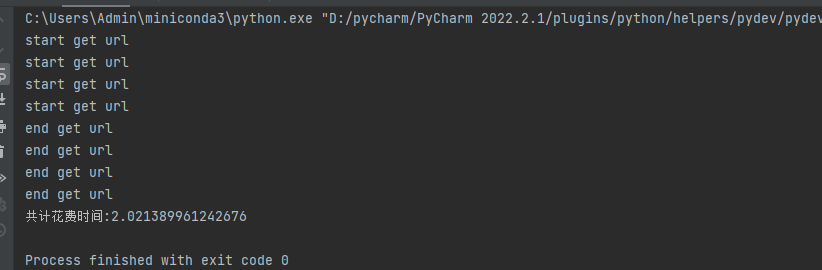
    loop = asyncio.get_event_loop()
    group1 = [get_html("http://www.baidu.com") for _ in range(2)]
    group2 = [get_html("http://www.baidu.com") for _ in range(2)]
    group1 = asyncio.gather(*group1)
    group2 = asyncio.gather(*group2)
    #group1.cancel() 取消任务
    loop.run_until_complete(asyncio.gather(group1,group2))  # 带* 号表示传递的为可迭代的对象
    end_time = time.time()
    print("共计花费时间:{}".format(end_time - start_time))
二、13-3 task取消和子协程调用原理
task 任务取消
import asyncio

async def get_html(time):
    print("start get html")
    await asyncio.sleep(time)
    print("end get html")

if __name__ == '__main__':
    task1 = get_html(2)
    task2 = get_html(3)
    task3 = get_html(3)

    tasks = [task1, task2, task3]
    loop = asyncio.get_event_loop()
    try:
        loop.run_until_complete(asyncio.wait(tasks))
    except KeyboardInterrupt as e:
        # loop需要传入, 最新的已经该版
        all_tasks = asyncio.all_tasks(loop=loop)
        for task in all_tasks:
            print("task cancel")
            task.cancel()
        loop.stop()
        loop.run_forever()
    finally:
        loop.close()
协程嵌套
import asyncio
async def nested():
print("This is the nested coroutine")
await asyncio.sleep(2)
return "Nested coroutine result"
async def main():
print("Main coroutine started")
# 调用嵌套的协程
result = await nested()
print("Main coroutine received:", result)
print("Main coroutine finished")
# 运行主协程
asyncio.run(main())
```
在这个例子中:
1. `nested` 是一个简单的协程,它打印一条消息,等待 2 秒钟,然后返回一个结果。
2. `main` 是主协程,它调用 `nested` 协程并等待其完成,然后打印接收到的结果。
当您运行这个脚本时,输出将如下所示:
```
Main coroutine started
This is the nested coroutine
Main coroutine received: Nested coroutine result
Main coroutine finished
```
这个例子展示了如何在一个协程中调用另一个协程,并使用 `await` 等待其完成。
三、 call函数
在 Python 中,asyncio 模块提供了多种方法来调度和管理任务。这些方法包括 call_soon, call_later, call_at 和 call_soon_threadsafe。它们的主要用途是调度回调函数在事件循环中的不同时间点运行。以下是对这些方法及其业务场景的详细介绍:
1. call_soon
描述:
call_soon 方法用于安排一个回调函数在事件循环的下一次迭代中尽快执行。使用场景: 当您需要尽快执行一个回调函数,但又不希望阻塞当前的代码执行时,可以使用
call_soon。示例:
import asyncio

def my_callback():
    print("Callback executed")

loop = asyncio.get_event_loop()
loop.call_soon(my_callback)
loop.run_forever()
2. call_later
描述:
call_later 方法用于安排一个回调函数在指定的延迟时间之后执行。使用场景: 当您需要在一定时间延迟后执行一个回调函数时,可以使用
call_later。示例:
import asyncio

def my_callback():
    print("Callback executed after 5 seconds")

loop = asyncio.get_event_loop()
loop.call_later(5, my_callback)
loop.run_forever()
3. call_at
描述:
call_at 方法用于安排一个回调函数在指定的绝对时间点执行。时间点使用事件循环的时间(通过loop.time() 获取)。使用场景: 当您需要在一个特定的时间点执行一个回调函数时,可以使用
call_at。示例:
import asyncio

def my_callback():
    print("Callback executed at specific time")

loop = asyncio.get_event_loop()
scheduled_time = loop.time() + 10  # 10秒后的时间点
loop.call_at(scheduled_time, my_callback)
loop.run_forever()
4. call_soon_threadsafe
描述:
call_soon_threadsafe 方法用于安排一个回调函数在事件循环的下一次迭代中尽快执行,并且是线程安全的。可以从其他线程调用。使用场景: 当您需要从另一个线程安全地安排一个回调函数在事件循环中执行时,可以使用
call_soon_threadsafe。示例:
import asyncio
import threading

def my_callback():
    print("Callback executed from another thread")

def thread_function(loop):
    loop.call_soon_threadsafe(my_callback)

loop = asyncio.get_event_loop()
thread = threading.Thread(target=thread_function, args=(loop,))
thread.start()
loop.run_forever()
总结
call_soon: 尽快执行回调函数,适用于需要立即执行的任务。
call_later: 在指定延迟时间后执行回调函数,适用于需要延迟执行的任务。
call_at: 在指定时间点执行回调函数,适用于需要在特定时间点执行的任务。
call_soon_threadsafe: 尽快执行回调函数,并且线程安全,适用于从其他线程调度任务。
这些方法可以帮助您在不同的时间点和不同的线程环境中调度回调函数,从而实现更加灵活和高效的异步编程。
四、ThreadPoolExecutor和aysncio完成阻塞请求
使用线程池和asyncio 运行同步代码
import asyncio
import time

#引入并发线程池
from concurrent.futures import ThreadPoolExecutor

#定义一个同步方法
def get_html(url):
    print("获取url: {}".format(url))
    time.sleep(3)
    print("get_html end ")

if __name__ == '__main__':
    start_time = time.time()
    loop = asyncio.get_event_loop()
    executor = ThreadPoolExecutor()
    tasks = []
    tasks = [loop.run_in_executor(executor,get_html, "http://www.baidu.com") for _ in range(3)]
    loop.run_until_complete(asyncio.wait(tasks))
    print("cost time :{}".format(time.time()-start_time))
评论区